
How can we find free web developer tools? The landscape of web development shifts rapidly. Every single year, a dozen new frameworks arrive, promising to change how we build apps, while shiny cloud platforms fight for our attention. When you are just starting out, this non-stop evolution feels incredibly overwhelming. But here is the good news: you do not need expensive software corporate licenses or massive enterprise budgets to build beautiful, working web applications. Some of the most powerful software tools in the tech industry today are completely open-source and free.
Building a good local setup is all about finding reliable, high-utility tools that actually play well together. For a beginner, you want tools that simply get out of your way and remove friction from writing code, fixing bugs, and deploying sites. This practical guide breaks down the absolute essentials you need to build a complete, modern development stack without spending a single dollar.
1. Code Editors (Your Daily Workspace)
Your code editor is where you will end up spending roughly eighty percent of your working hours. It has to be fast, easy to customize, and smart enough to catch silly typos before they break your entire application.
Visual Studio Code (VS Code)
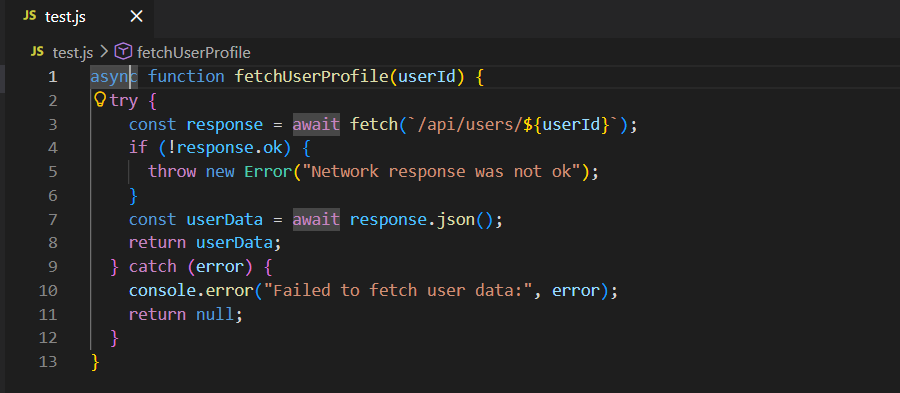
While alternative tools like WebStorm or classic text configurations like Vim have incredibly passionate users, Microsoft’s Visual Studio Code is still the king of editors for beginners and professional engineers alike. It is fast and lightweight when you first install it, but it easily transforms into a powerful integrated development environment through its massive marketplace of add-ons.
- IntelliSense
This built-in helper gives you smart autocomplete suggestions based on your variables, functions, and modules. It speeds up your daily typing and helps you pick up syntax rules naturally as you work.
- Built-in Terminal
No need to jump back and forth between different app windows just to run your server. VS Code lets you open a command line directly inside your workspace.
- Git Integration
You can easily track changes, stage files, and type out commit messages without ever looking away from your active file.
Simple Extensions to Install First
To get the absolute best experience out of your editor, grab these three essential add-ons right away:
- Prettier
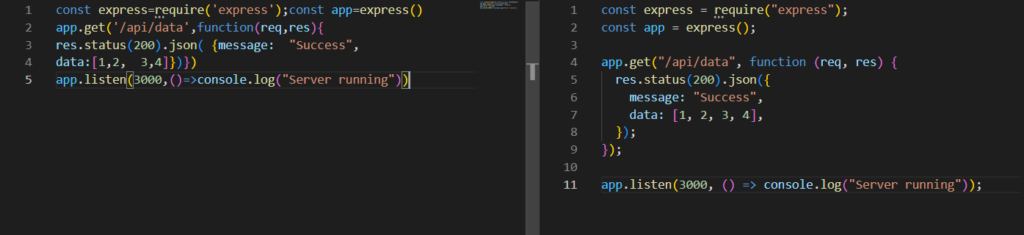
A handy code formatter that cleans up your layouts and forces a neat, consistent look across HTML, CSS, and JavaScript files every single time you hit save.
- Live Server

Spins up a local development server with automatic reloading, meaning you can view user interface changes instantly in your browser window.
- Error Lens
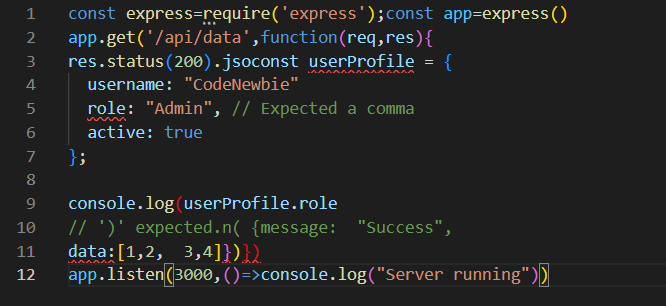
Inline highlights show errors and warnings immediately on the broken line of code, so you do not have to dig through separate terminal logs to see what went wrong.
2. Version Control (Your Project Time Machine)
When you start changing lines of code, things will break. It is inevitable. Version control acts as a safety net, ensuring you have a clear history of your files so you can roll back whenever a weird bug ruins your progress.
Think of the workflow like this: your local computer tracks the raw changes, saves those snapshots into a local repository, and eventually uploads everything safely to remote cloud servers.
- Git
Git is a simple command-line tool designed to track the chronological history of your code adjustments. It functions like a time machine for your development projects. Instead of saving cluttered files with names like final-version-two, Git saves clean, incremental updates through checkpoints called commits. Learning a few basic commands early on lets you open up new projects, save snapshots with descriptive notes, and push your work up to the web safely.
- GitHub
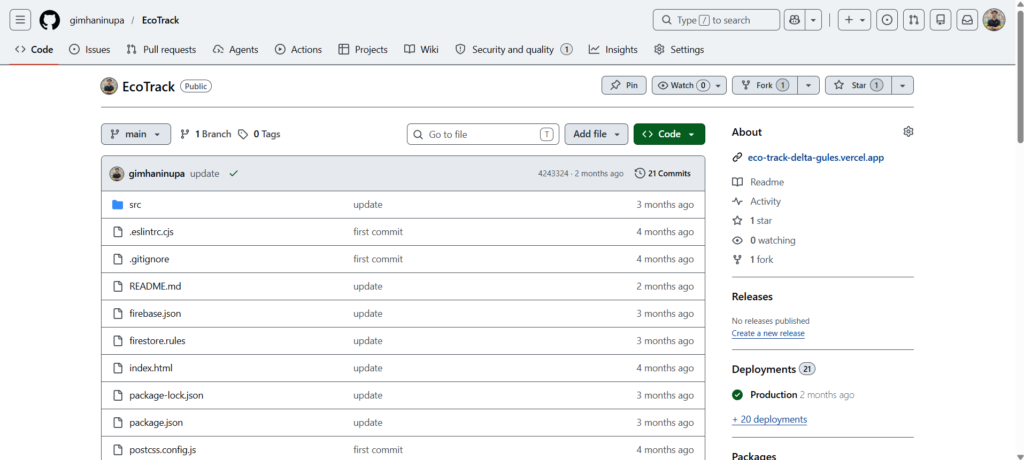
While Git handles tracking files locally on your own machine, GitHub is the online platform where those logs get stored securely in the cloud. It works as a mix of cloud storage, portfolio display, and community network.
For an aspiring engineer, a GitHub profile is your real resume. Tech companies care much more about public repositories containing real, working code than they do about a traditional PDF resume. Plus, GitHub includes a fantastic free service called GitHub Pages, which lets you host static front-end websites online completely free.
3. Interfaces and Styling (Building Visual Layouts)
The visual side of web design demands proper organization and clean layouts. Trying to write raw, unorganized CSS for large projects turns into a total nightmare. Modern styling tools help you construct clean, responsive layouts incredibly fast.
- Tailwind CSS
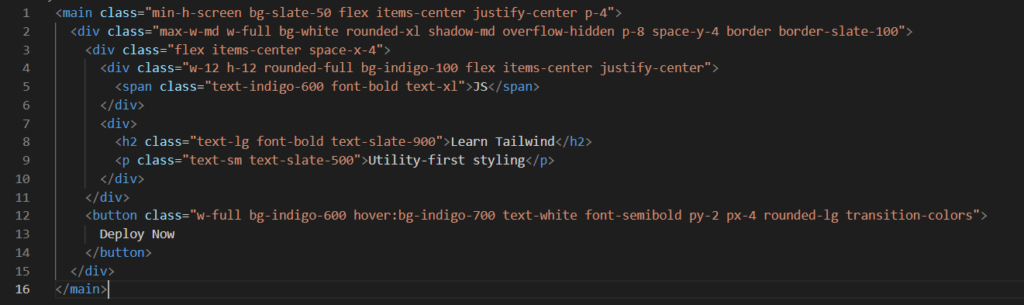
Old-school CSS styling meant creating separate design sheets and constantly jumping back and forth between documents just to adjust a margin. Tailwind CSS flips this model on its head by using a utility-first workflow. It hands you tiny, pre-made utility classes that you type right inside your HTML markup or component files.
Instead of writing a custom class name and defining values in an external file, you apply direct properties for background shades, internal padding, rounded corners, and soft drop shadows right on the element. This cuts down on the time spent dreaming up class names and guarantees your layout scales nicely across smartphones, tablets, and wide computer monitors.
- Frontend Libraries (React vs. Vanilla JavaScript)
You absolutely must master foundational coding with vanilla scripts first, but modern web apps rely heavily on component frameworks to manage dynamic user views.
| Tool | Ideal Use Case | Main Benefit | Learning Path |
| Vanilla JavaScript | Simple marketing pages, basic contact forms, light scripts | Zero setup required, runs instantly in every browser | Low to Moderate |
| React | Complex web apps, SaaS dashboards, interactive tools | Reusable components, massive community and job market | Moderate to High |
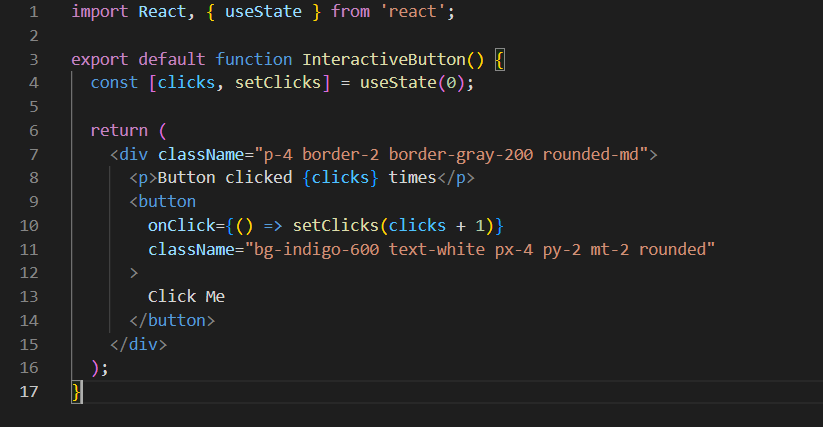
React is still a crucial library to learn. Its component-driven style lets you write an interface piece once, like a navigation menu or product block, and drop it anywhere across your site while updating page data automatically without messy manual page updates.
4. Runtimes and Packages (The Underlying Engine)
Modern websites are rarely built completely from scratch anymore. Software developers rely on open-source packages built by the tech community, like user login managers, visual charts, or smooth animation tools. Keeping track of these extensions requires proper local runtime tools.
For a long time, JavaScript could only execute inside a web browser window. Node.js completely shifted the industry by pulling out Google Chrome’s core engine and letting JavaScript run directly on your computer’s local operating system.
Now, you can easily write backend server scripts, manage database connections, and build local development environments using one single language. For beginners, Node.js is mandatory because it serves as the foundation for modern frontend frameworks like React or Next.js.
- npm (Node Package Manager)
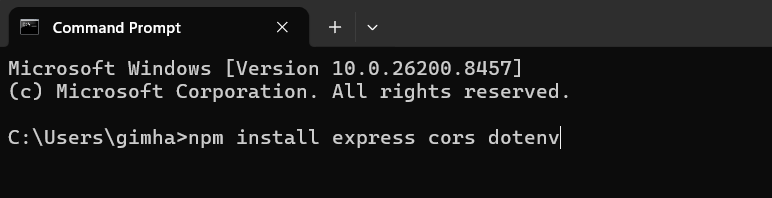
When you install Node.js, you get npm bundled with it automatically, opening up the largest software registry on Earth. Think of npm as a free App Store built exclusively for developer code libraries. If your project needs advanced calendar dates or unique ID tracking, you do not need to spend weeks writing custom logic. Instead, you run a quick terminal command to install a verified community package instantly.
Using automated script shortcuts inside your configuration files lets you speed up boring, repetitive tasks like starting up local testing environments or prepping your project files for launch.
5. Databases (Saving and Managing App Information)
Every interactive app out there requires a solid way to save persistent data, whether that means user accounts, digital store items, or simple comments. As you start out, you need to understand the main difference between relational and non-relational database styles.
PostgreSQL (Relational SQL)
PostgreSQL is an incredibly stable, open-source relational database that models information into strict data tables with clear rows and columns, similar to an intelligent spreadsheet grid. It relies on Structured Query Language to link data relationships and pull records.
Developers love PostgreSQL because it maintains tight data rules, keeps records absolutely consistent, and executes complicated search queries smoothly. It is the perfect option for apps where data structure stays fixed and accuracy is critical, like payment processors or warehouse tracking tools.
MongoDB (Non-Relational NoSQL)
If your app deals with fluid, fast-changing data records, MongoDB is a wonderful alternative. Instead of using traditional rigid tables, MongoDB saves information inside flexible documents that look just like standard JavaScript data objects.
This document approach matches the way modern web data naturally moves around, making it highly intuitive for self-taught full-stack developers. There are no strict layouts to set up beforehand, giving you the freedom to tweak your data fields as your project grows and changes over time.
6. Testing Environments (Checking Your Data Pipelines)
A huge part of software development is simply testing the communication between your frontend web design and your backend server code. Having clear visibility into these pipelines saves you hours of painful guesswork when things act up.
Database GUIs (TablePlus and DBeaver)
Typing raw database queries into a dark command terminal just to check if a user sign-up worked is slow and easy to mess up with typos. Database Graphical User Interfaces solve this by giving you a beautiful visual dashboard to browse, edit, and filter your tables directly.
- TablePlus
A fast, native interface with a super clean look, making it incredibly responsive and straightforward for newcomers.
- DBeaver
A massive, open-source tool that connects to almost every database system out there, perfect for exploring different setups.
Using a visual manager lets you check structural tables quickly, run test edits inside a visual window, and catch data mistakes immediately.
Postman
When building full-stack web projects, your backend server talks to your frontend UI via APIs. Postman is a tool that lets you test these backend data pathways completely on their own before you even start writing visual frontend layouts.
With Postman, you can send direct data requests right to your local server setup. You can pass user authentication keys, review the raw JSON data sent back by your server, and check server status codes to ensure your logic behaves properly under different circumstances.
7. Cloud Hosting (Launching Projects Globally)
A web app that lives purely on your personal laptop will not help you catch the eye of a client or a hiring manager. You need to move your code over to public web hosting platforms where anyone across the globe can click around and test your creations.
- Vercel and Netlify
When it comes to frontend layouts and modern frameworks, Vercel and Netlify deliver incredible, zero-cost cloud hosting. They use a smart workflow called continuous deployment that hooks directly into your GitHub account.
Every single time you save code changes and push them to GitHub, these cloud systems catch the update, run an automatic production build, and refresh your live public website within seconds. They even handle security setup by giving you free SSL encryption certificates instantly.
- Render and Supabase
If your web project uses a constant backend server environment or a dedicated cloud database, basic frontend hosting won’t cut it. You will need proper cloud hosting built for backend systems.
- Render
Offers a highly accessible free tier that hosts web background tasks, server APIs, and full applications. It is an amazing spot for running Node.js apps.
- Supabase
A great open-source alternative to platforms like Firebase. It gives you a complete PostgreSQL database, built-in user login tracking, and cloud file storage immediately. Its free tier is incredibly generous for side projects.
8. Step-by-Step Plan for Your First Stack
Do not make the classic rookie mistake of installing all these tools on day one and trying to learn them all together. That is a quick recipe for setup confusion and total burnout. Instead, introduce new tools gradually as your projects grow naturally.
Phase 1 >> Core Frontend
Start your coding journey by downloading your main editor and learning basic page layouts. Focus heavily on building clean, mobile-friendly layouts using utility styling classes. Run your mock pages locally using live browser extensions, and track your code updates step-by-step using cloud version control.
Phase 2 >> Adding Automation
Once you feel comfortable handling page styling and basic script triggers, install your local runtime engine to execute scripts outside the browser window. Start using package managers to pull in helper libraries, and step up from individual files to modular components inside frontend libraries. This is the perfect stage to deploy a live web portfolio using automated hosting platforms.
Phase 3 >> Going Full-Stack
When you feel ready to store data records and manage user accounts, build a standalone backend application. Test your server endpoints cleanly using API testing software. Link up your server to a cloud database or a local document storage setup, checking your tables visually with a database interface tool. Finally, push your entire server app live onto cloud backend hosting.
Quick Review of Your Free Toolkit
Keep your local setup clean and focused by mastering this core list of free utilities before moving on to other complicated software setups.
| Task | Recommended Free Tool | Role in Your Tech Stack |
| Code Editor | Visual Studio Code | Writing, organizing, and debugging your raw code files |
| Version Control | Git & GitHub | Saving history records and hosting your public portfolio |
| Styling Layouts | Tailwind CSS | Quick, responsive interface styling directly in your markup |
| Local Runtime | Node.js & npm | Running scripts on your machine and adding dependencies |
| Data Storage | PostgreSQL / MongoDB | Keeping track of user profiles, store products, and app data |
| API Diagnostics | Postman | Running direct tests on your backend communication pipelines |
| Live Hosting | Vercel & Render | Putting frontend layouts and backend APIs out on the web |
By spending your energy mastering these free foundational platforms, you skip upfront financial costs while assembling a professional workspace. These are the exact same tools powering modern software teams around the world every single day. Understand them deeply, build real projects, keep your work public on your portfolio, and your journey as a developer will progress naturally.
If you want to understand the exact math behind styling perfect components, read our The Developer’s Guide to Perfecting CSS Border-Radius (2026).

I am a young, curious project management student, passionate about leadership. I take an agile approach to writing and talk about things such as strategic planning and team dynamics. I enjoy breaking down complicated systems into easy-to-understand, captivating tales. To enable teams to learn and apply practical knowledge that will help them achieve success in the real world, where challenges arise.





Leave a Reply